When most people think “homelab,” they picture a dusty old PC running Plex and maybe a Pi-hole. What I built is something considerably different: a six-node RHEL 9 Kubernetes cluster with full GitOps CI/CD, enterprise-grade observability, split-horizon DNS, wildcard TLS, and a growing stack of self-hosted applications — all running on hardware I own, in my own environment.
And throughout the entire build, I had Claude as my copilot.
This post is a deep dive into what we built together, the problems we solved, and why this homelab is more “production infrastructure” than “weekend project.”
The Hardware
Before getting into the software stack, it’s worth talking about the hardware — because the hardware is a big part of what makes this interesting.
Every node in this cluster runs on a Dell OptiPlex 3020 Micro. Not a rack server. Not a NUC. A tiny, fanless-adjacent business desktop that Dell sold by the thousands to corporate offices starting around 2013.

Each one is configured with:
| Component | Spec |
|---|---|
| CPU | Intel Core i5-4590T (4 cores, 2.0GHz base / 3.0GHz boost, 35W TDP) |
| RAM | 16GB DDR3L-1600 SO-DIMM |
| Storage | 256GB SSD |
| Network | Intel I217LM Gigabit Ethernet |
| Form factor | 182 × 178 × 36 mm — roughly the size of a paperback book |
| Idle power draw | ~10–15W per node |
Six of these fit on a single shelf. All six together draw less power at idle than a single traditional rack server. When you’re running 24/7 infrastructure at home, that power profile matters — both for the electric bill and for the thermal load in the room.
The real story is the price. These machines are fully depreciated enterprise hardware. Corporate refresh cycles pushed them out of data centers years ago, and they’ve been sitting in refurbisher warehouses ever since. On eBay right now you can find i5 / 16GB / 256GB SSD units — already loaded and ready to run — for $40–70 each. For a six-node cluster, that’s a $300–400 hardware investment total.
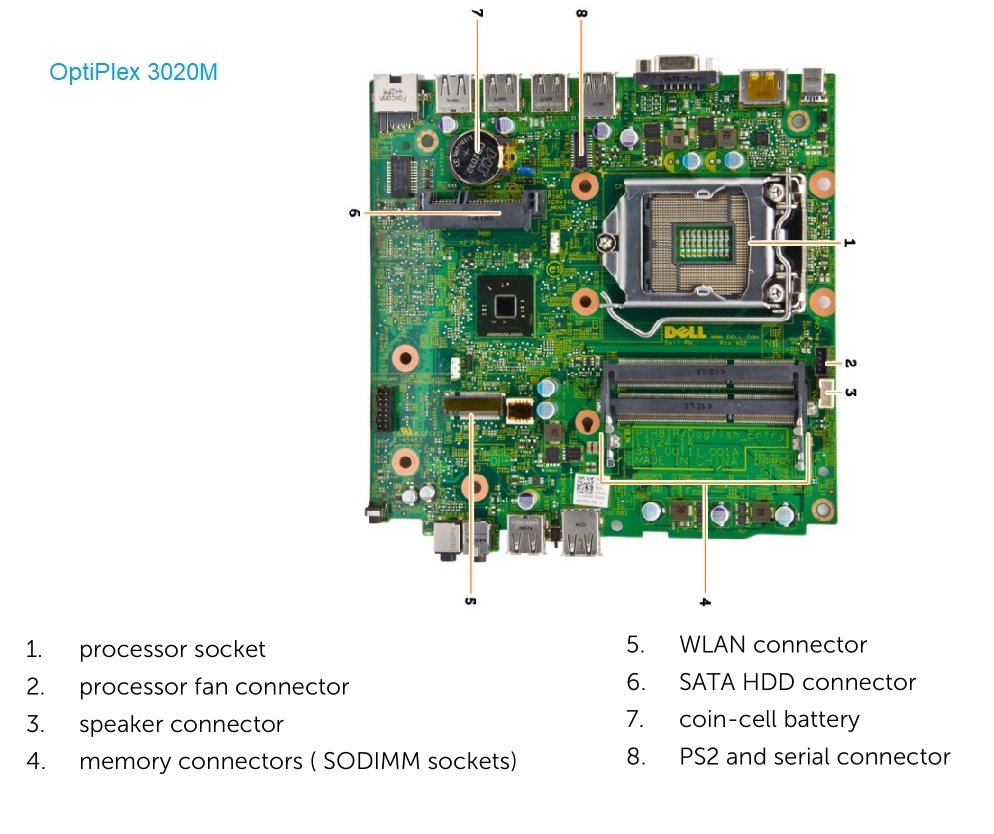
The internals are deliberately simple: two SO-DIMM slots (maxing at 16GB), one 2.5” drive bay, one M.2 slot, and a standard LGA1150 socket. There’s nothing exotic to source or fail. The 35W i5-4590T is purpose-built for this form factor — it’s thermally constrained for passively-cooled or small-fan enclosures, which means it runs cool and quiet under the kind of I/O-light Kubernetes workloads that make up most of a control plane node’s day.
Some good starting points if you want to build something similar:
The only real limitation is the 16GB RAM ceiling — if you’re planning to run memory-heavy workloads like Elasticsearch directly on the node rather than pinning them to a beefier host, you’ll want to account for that. In this setup, Elasticsearch runs on four worker nodes with local SSD storage via OpenEBS, and 16GB is workable for the K8s node overhead plus one or two moderate workloads.
The Foundation: A Six-Node RHEL 9 Kubernetes Cluster
The cluster runs on Red Hat Enterprise Linux 9. Not Ubuntu, not Debian — RHEL 9 is what I work with professionally, and I wanted the homelab to actually reflect how I work.
- master01 (192.168.1.11), master02 (192.168.1.12) — control plane
- kube01–kube04 (192.168.1.13–16) — workers
- VIP: 192.168.1.30 — HA endpoint via keepalived
All of this runs on a free Red Hat Developer Subscription — and if you’re not already using one, it’s worth knowing about. It grants full access to RHEL and a growing library of Red Hat software for development and personal use, at no cost. That includes RHEL 9, all the official repos, and access to Red Hat’s ecosystem of enterprise tooling. The only restriction is that it’s not for production commercial use. For a homelab, it’s everything you need.
The original plan was to run Red Hat OpenShift — which would have given us a fully supported, enterprise-grade Kubernetes distribution with built-in operator lifecycle management and a proper web console. The hardware killed that idea. OpenShift’s minimum requirements are well beyond what a shelf of OptiPlex 3020 Micros can offer — it wants more cores, more RAM, and more storage per node than these machines have. Self-managed Kubernetes on RHEL 9 gets us most of the same operational rigor without the resource floor.
The CNI is Cilium, picked for its eBPF-based networking and observability. Early on there was a kernel interaction issue between RHEL 9 and crun that required a pivot to runc with CRI-O 1.32 — Claude helped me track down the root cause and move quickly.
MetalLB handles bare-metal load balancing across an IP pool in the 192.168.1.30–50 range. Traefik v3 sits at the .30 VIP and routes all inbound traffic by hostname.
Identity and Access: Red Hat IDM
Running a dozen services across a homelab creates an authentication problem fast. Without a central identity source, you end up with a dozen separate user databases, no consistent password policy, and no single place to revoke access when something changes.
Red Hat IDM (Identity Management) solves that. It’s the upstream of Red Hat’s enterprise identity platform, and it gives the homelab a proper LDAP directory, a Kerberos realm (BLACKBURN.LAN), an integrated certificate authority, and a DNS server — all in one. Two IDM instances run here (idm01 and idm02) with a keepalived VIP at idm.blackburn.lan for high availability.
In practice, what this means is that every application in the stack authenticates against a single directory:
- GitLab — LDAP login via IDM;
app-gitlab-usersgrants access,app-gitlab-adminsgrants admin - AWX — same pattern with
app-awx-usersandapp-awx-admins - Vault — LDAP auth backend pointed at IDM; group membership controls which policies are applied
- Nexus — LDAP-backed login with
app-nexus-userscontrolling read access - SSH access — HBAC (host-based access control) rules in IDM gate which users can SSH to which hosts; the
infra-adminsgroup gets access to everything with passwordless sudo via IDM-managed sudo rules
Add a user to IDM once, put them in the right groups, and they have appropriate access across the entire stack. Remove them from IDM and they’re gone everywhere simultaneously. That’s the value — not just convenience, but a single authoritative place to manage who has access to what.
IDM also handles DNS for the internal blackburn.lan zone, which is what makes the split-horizon setup work. Internal services resolve via IDM; public services resolve via Cloudflare. The two never need to know about each other.
Networking and DNS: Split-Horizon Done Right
Networking was one of the most architecturally interesting parts of the build. The environment runs a full split-horizon DNS setup:
burnedworm.com— External zone managed through Cloudflare, used for public-facing and cluster services accessible from outsideblackburn.lan— Internal zone managed by Red Hat IDM (with a replica atidm02.blackburn.lan), covering all internal VMs and infrastructurek8s.burnedworm.com— A stub zone that resolves cluster services liketraefik.k8s.burnedworm.com,elastic.k8s.blackburn.lan, and similar
One of the more subtle issues we worked through together was cert-manager’s DNS-01 challenge behavior in this environment. Because IDM intercepts internal DNS resolution, cert-manager needed to be configured with --dns01-recursive-nameservers-only and pointed at external resolvers — otherwise it would get authoritative answers from IDM that didn’t reflect the Cloudflare TXT records it needed to validate. Claude diagnosed this quickly and provided the exact flag and resolver configuration needed to make wildcard cert issuance work cleanly.
The result: a wildcard certificate for *.k8s.burnedworm.com issued automatically via cert-manager + Cloudflare DNS-01, renewed without human intervention.
TLS Everywhere, Automatically
Every service in the cluster gets HTTPS automatically through the wildcard cert. Traefik handles termination, and cert-manager handles renewal. The Traefik dashboard itself is accessible at traefik.k8s.burnedworm.com over HTTPS.
For the Elastic Stack specifically, Elasticsearch 9.x defaults to HTTP/2 with TLS, which introduced some interesting Traefik compatibility considerations. Claude helped me work through the implications of HTTP/2 passthrough versus termination and get the stack talking cleanly.
Storage: NFS and OpenEBS for the Right Workloads
Storage is handled by multiple storage classes, each suited to different workload profiles:
nfs-hdd(default) — Backed by TrueNAS at/mnt/GP/kubernetesover NFS, suitable for most workloadsnfs-ssd— Higher I/O NFS storage for latency-sensitive applicationsopenebs-hostpath— Local node storage, used specifically for Elasticsearch to avoid NFS overhead on a search workload
Pinning Elasticsearch to specific nodes via openebs-hostpath was one of those decisions that required understanding both Kubernetes scheduling (node selectors, tolerations) and Elasticsearch’s shard allocation behavior. Claude walked through both layers with me to arrive at a configuration that’s stable and performant.
The Application Stack
Elastic Stack (ECK 3.3.1 / Elastic 9.x)
The Elastic Stack is a centerpiece of the environment. Deployed via ECK (Elastic Cloud on Kubernetes) operator, the stack includes Elasticsearch, Kibana, Fleet Server, and an Elastic Agent DaemonSet running on all nodes — including masters, via tolerations.
The upgrade from Elastic 8.x to 9.3.2 was a significant undertaking. Key gotchas we documented and worked through:
logsdbmode auto-enabling onlogs-*data streams in 9.x- HTTP/2 as the default transport with TLS (relevant to ingress configuration)
- Kibana’s new requirement for
encryptedSavedObjects.encryptionKey - Legacy index template conflicts requiring cleanup before upgrade
AWX (Upstream of Ansible Automation Platform)
AWX is the open-source upstream project that Red Hat’s Ansible Automation Platform (formerly Ansible Tower) is built from. In a fully licensed enterprise environment this would run as AAP — but with a Red Hat Developer Subscription, AAP licensing doesn’t extend to homelab use. AWX fills that gap: it’s functionally equivalent for automation workflows, runs on the same awx-operator Helm chart, and gives the same web UI and API without the licensing constraint.
AWX is deployed via the awx-operator, backed by an external PostgreSQL instance running on a dedicated database.blackburn.lan VM (192.168.1.187). Keeping the database external rather than in-cluster is a deliberate architectural choice — it simplifies backup, recovery, and cluster lifecycle management.
GitLab and GitOps CI/CD
A self-hosted GitLab instance runs at gitlab.blackburn.lan (192.168.1.156), and it’s the engine behind the GitOps workflow. CI/CD pipelines use bitnami/kubectl:latest with a manually provisioned kubeconfig built from KUBE_CA_CERT, KUBE_URL, and KUBE_TOKEN variables — intentionally explicit and auditable rather than relying on opaque operator magic.
Pipelines handle everything from building container images with Kaniko (no Docker daemon required in the runner) to deploying Kubernetes manifests with kubectl apply. Version variables are injected via sed substitution at pipeline time, keeping manifests clean and the CI config as the source of truth.
Logstash pipeline configurations are managed as Git-tracked files in a conf.d/ directory with numerically-prefixed files (10-beats-input.conf, 50-filters.conf, 90-elastic-output.conf), dynamically assembled into a ConfigMap by the CI pipeline at deploy time.
Cribl Stream
Cribl Stream 4.17.0 is deployed in Kubernetes as a critical piece of the observability pipeline. It sits between log sources and Elasticsearch, providing fan-out routing, parsing, and data enrichment capabilities. Getting Cribl running in Kubernetes required working through some non-obvious configuration details:
- The correct environment variable for the config volume is
CRIBL_VOLUME_DIR, not what the docs imply - The mount path must be
/opt/cribl/config - The deployment strategy must be
Recreate(notRollingUpdate) when using an RWO PVC, since two pods cannot mount the same RWO volume simultaneously
Claude was invaluable in diagnosing the PVC mount contention and identifying the deployment strategy as the fix — a classic “obvious in hindsight” problem.
Uptime Kuma
Monitoring is handled by Uptime Kuma, with custom monitors including:
- Elasticsearch cluster health via JSONPath (
$.status=green) - Kibana availability via
$.status.overall.level=available
Alerts are delivered via Resend (SMTP through smtp.resend.com) using the burnedworm.com domain.
Plex
Even Plex is part of the stack — running on TrueNAS directly, with the media library organized using MusicBrainz Picard for acoustic fingerprinting and beets for CLI-based pipeline automation.
What Made This Work: The AI Collaboration
Building infrastructure at this level of complexity means constantly context-switching between Kubernetes internals, Linux networking, and application-specific behavior. The value Claude provided wasn’t just answering individual questions — it was maintaining context across long, complex troubleshooting threads.
Some specific examples where Claude made a real difference:
cert-manager DNS-01 with IDM: Diagnosing why wildcard cert issuance was failing in a split-horizon DNS environment and identifying --dns01-recursive-nameservers-only as the fix required understanding three different systems simultaneously.
Cribl PVC mount contention: Understanding why Cribl’s pod was failing to start, tracing it to RWO PVC semantics and the RollingUpdate strategy, and pivoting to Recreate — all while also identifying CRIBL_VOLUME_DIR as the correct config volume environment variable.
Elastic 8→9 upgrade: Coordinating an upgrade across ECK operator, Elasticsearch, Kibana, Fleet, and Elastic Agent — with multiple breaking changes — required careful sequencing and a clear picture of what changed between versions.
The Architecture in Summary
| Layer | Technology |
|---|---|
| OS | RHEL 9 |
| Kubernetes | Self-managed, CRI-O 1.32 + runc |
| CNI | Cilium |
| Ingress | Traefik v3 |
| Load Balancing | MetalLB |
| TLS | cert-manager + Cloudflare DNS-01 |
| Storage | NFS (TrueNAS) + OpenEBS hostpath |
| DNS | Red Hat IDM + Cloudflare (split-horizon) |
| Observability | Elastic Stack 9.x (ECK), Logstash, Cribl Stream |
| Automation | AWX (upstream of Ansible Automation Platform) |
| CI/CD | GitLab + GitLab Runner + Kaniko |
| Monitoring | Uptime Kuma + Resend |
Final Thoughts
This isn’t a homelab in the casual sense — it’s a production-equivalent environment that happens to run on hardware I own. Every architectural decision mirrors what you’d find in an enterprise environment: HA control plane, external databases, GitOps deployments, split-horizon DNS, automated TLS, and a real observability pipeline.
The collaboration with Claude throughout this build was genuinely useful. Not because it replaced the need to understand the systems — it didn’t — but because it compressed the time between “I see a problem” and “I understand the problem well enough to fix it.” For complex infrastructure work, that’s exactly what you want from an AI assistant.
If you’re building something similar and want to talk through the architecture, find me online. And if you’re wondering whether AI assistance is actually useful for serious infrastructure work — based on this experience, the answer is yes.
Jeremy Blackburn is a systems and infrastructure engineer and principal of Initech Advising LLC. He helps organizations modernize infrastructure and build reliable platforms at scale.